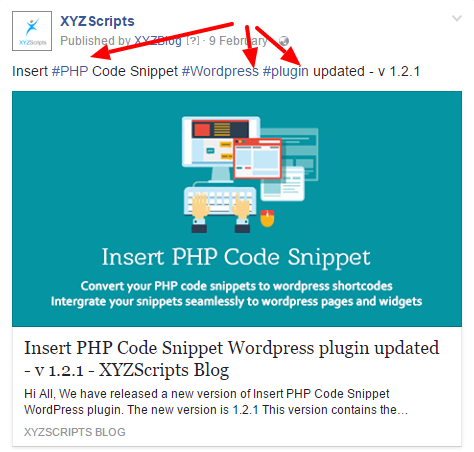
You can use the “Hash Tag” option in the premium plugin.
In the premium plugin there is an option to add your hash tags in the settings page.
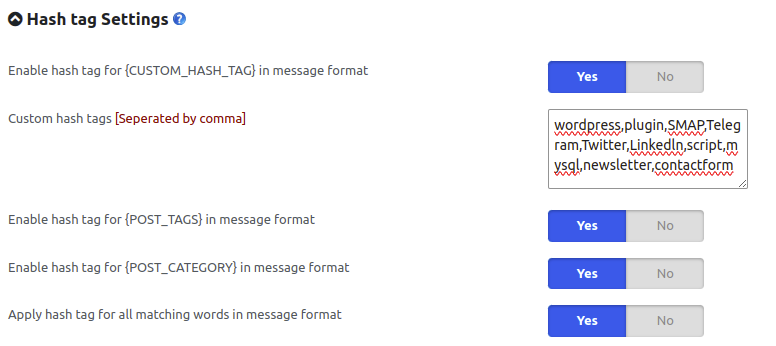
Enable hash tag for {CUSTOM_HASH_TAG} in message format
Replaces the {CUSTOM_HASH_TAG} placeholder in the message format with the hashtags specified in the Custom hash tags field.
Custom hash tags (Separated by comma)
Enter one or more custom hashtags separated by commas.
(Note: DON’T use the hash symbol # in the hash tags.)
Enable hash tag for {POST_TAGS} in message format
Replaces the {POST_TAGS} placeholder with the tags assigned to the WordPress post.
Enable hash tag for {POST_CATEGORY} in message format
Replaces the {POST_CATEGORY} placeholder with the categories assigned to the WordPress post.
Apply hash tag for all matching words in message format
Automatically converts matching words in the message format into hashtags based on the values specified in Custom hash tags.
Now when you publish a post to social media and if it contains any word in the hash tag section, it will be replaced as a hash tag.